|
 |
Welcome.Your student's library journey begins here.
|
 |
We are so excited to welcome your student to the Student Library Card partnership between Forsyth County Schools and Forsyth County Public Library.
Thank you for signing up for this program at the beginning of the 2025–2026 school year.
Your student's library card account is now ready to use and provides access to books, eBooks, online homework help, free tutoring, study rooms, and more! |
|
|
 |
Our libraries are open 7 days a week |
| |
 |
Free online tutoring and test prep |
| |
 |
Online homework help |
|
 |
Study rooms and computers |
|
|
Keep reading for important information on how to start using your student library card account.
| |
How to Use Your Student Library Card Account
|
|
|
Your student can now use their school-issued student ID number in lieu of a physical library card to access Forsyth County Public Library materials, resources, and services.
The default PIN associated with your student’s school-issued ID number is currently set to the student’s birthday in the following format: DDMM (DD = two digit day, MM = two digit month).
For example, a student with a birthday of August 14 has an initial default PIN of 1408.
We strongly encourage you or your student to change the PIN as soon as possible for security purposes.
Please note: student library card account PINs are restored to default once a year. Any PINs that were changed prior to the new school year have been restored to the default PIN and will need to be changed to the PIN of your choosing.
To change your student's PIN:
Go to the library website: ForsythPL.org Click on the My Account tab on the top menu bar. Enter the student ID number (no spaces) in the "Username or Barcode" field. (example: 123456) Enter the default PIN (birthday DDMM) in the "PIN" field and click the "Log In" button. Scroll down, then click to expand the "Change Logon" options. Click the "Change PIN" box and enter the default PIN, then the new PIN of your choosing (once in the "New PIN" box, and again in the "Retype PIN" box). Click the "Save" button.
If your student already has a personal library card (not based on their school ID number), it remains valid and can still be used in addition to their School Library Card account.
Information on loan periods, late fees, placing holds, and managing your account is available on the Getting Started section of the Library's website.
| |
How to Check Out Books and eLibrary Materials
|  |
Visit any of FCPL's five branches or our Bookmobile to check out books, DVDs, or other physical materials using the student ID number and PIN at the Ask Us desk or at the self-checkout stations.
Student cardholders may also place materials on hold for express pickup at their preferred FCPL location.
Please be advised that parents and guardians are responsible for monitoring student library card accounts to determine the suitability of materials for student use.
To access eBooks, eMagazines, eAudiobooks, online educational videos, tutoring, or other eLibrary items using your student ID and PIN, click one of the age-specific links below:
|
Kids: eBooks and eAudiobooks
eResources
Teens:
eBooks and eAudiobooks eResources |
| How to Return Materials
|
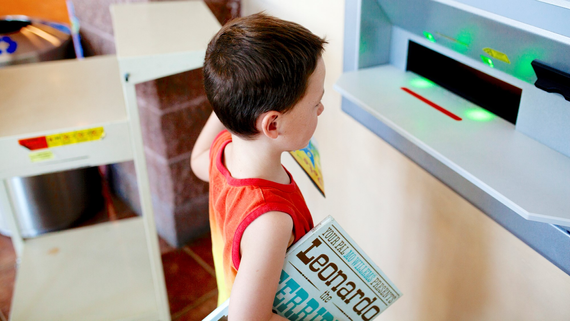 | Books and other physical materials may be checked out from any FCPL location and returned to any FCPL location.
As the parent or guardian of a student library cardholder, please understand that you are responsible for:
Returning all materials borrowed with your student’s library card, Paying late fees and penalties for loss or damage to materials.
|
| More Perks for Students
|  |
In addition to checking out materials, student library cards may also be used to reserve study rooms and to utilize desktop computers inside the library.
We also have laptops available for daily use inside the library and Chromebooks available at every location to check out for up to one month. Laptops and Chromebooks may only be checked out by patrons who are 13 or older with a library card in good standing. Patrons who are between the ages of 13–17 must have a parent or guardian sign an Electronic Device Use Agreement form in order to borrow electronic devices.
Check FCPL’s events calendar for details about upcoming free educational programs and events hosted by the library.
| |
Find Your Nearest Library
|
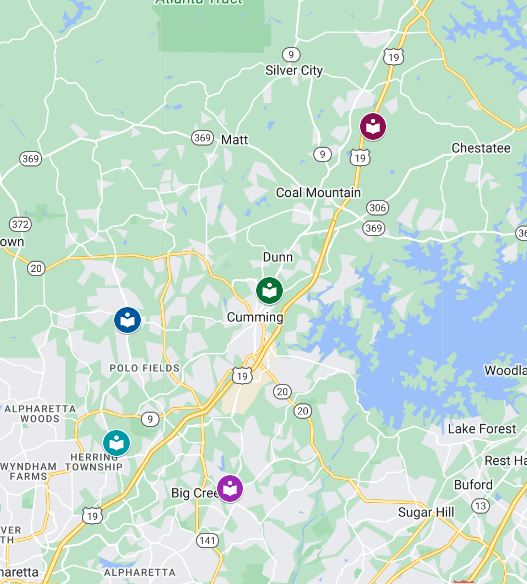 |
Forsyth County Public Library has five locations and a bookmobile to serve you. Details about our locations and operating hours can be found on our website.
Please stop by one of our Ask Us desks if you need help searching for an item, learning more about our resources, or using any of the Library's services.
|
|
|
|
Are you ready?
|
Please share this message with your student and help them log in to their student library card account using their student ID number and default PIN as explained above. Then please help them change their PIN using the instructions found near the top of this email.
If you need assistance, please email a librarian or call 770-781-9840.
|
| Get started now!
|
|
|


